Techtonic built the wall paint visualizer for JKMaxx Paints, a web application where homeowners upload a photo of their room or start from a sample room, paint each surface with JKMaxx shades, and compare the result with the original - giving customers a clear view of a colour before they buy.
The Challenge
Choosing a wall colour from a small printed chip is guesswork. Light, furniture and neighbouring walls change how a shade reads, so customers hesitate or choose wrongly. JKMaxx needed a tool customers could use on their own room, without a dealer visit or a designer. Core requirements included:
- A first step that takes seconds - upload a photo, or skip the photo and start from a ready room
- Surface-by-surface control, so each wall can carry its own shade rather than one colour for the whole room
- Interior and exterior coverage, with room types for living rooms, bedrooms, dining rooms, kids rooms, study rooms and house exteriors
- Every colour tied to the real JKMaxx fandeck, so the shades users shortlist are the shades they can buy
- A saved-projects experience, so users can return, compare and share their work
The Solution
- UI/UX Design: Techtonic designed the experience from scratch - wireframes through final visual design - around how a customer actually decides on paint: pick a room, pick a palette, see the result. A three-step flow (Choose a Template, Choose Palette, Visualise) keeps the path short and the screen uncluttered.
- Frontend: The interface was built in Next.js, covering the dashboard, template selection and the paint editor, with a fast, responsive experience on desktop and mobile browsers.
- Backend: Node.js powers the APIs behind user accounts, saved projects, project history, shade data and downloads.
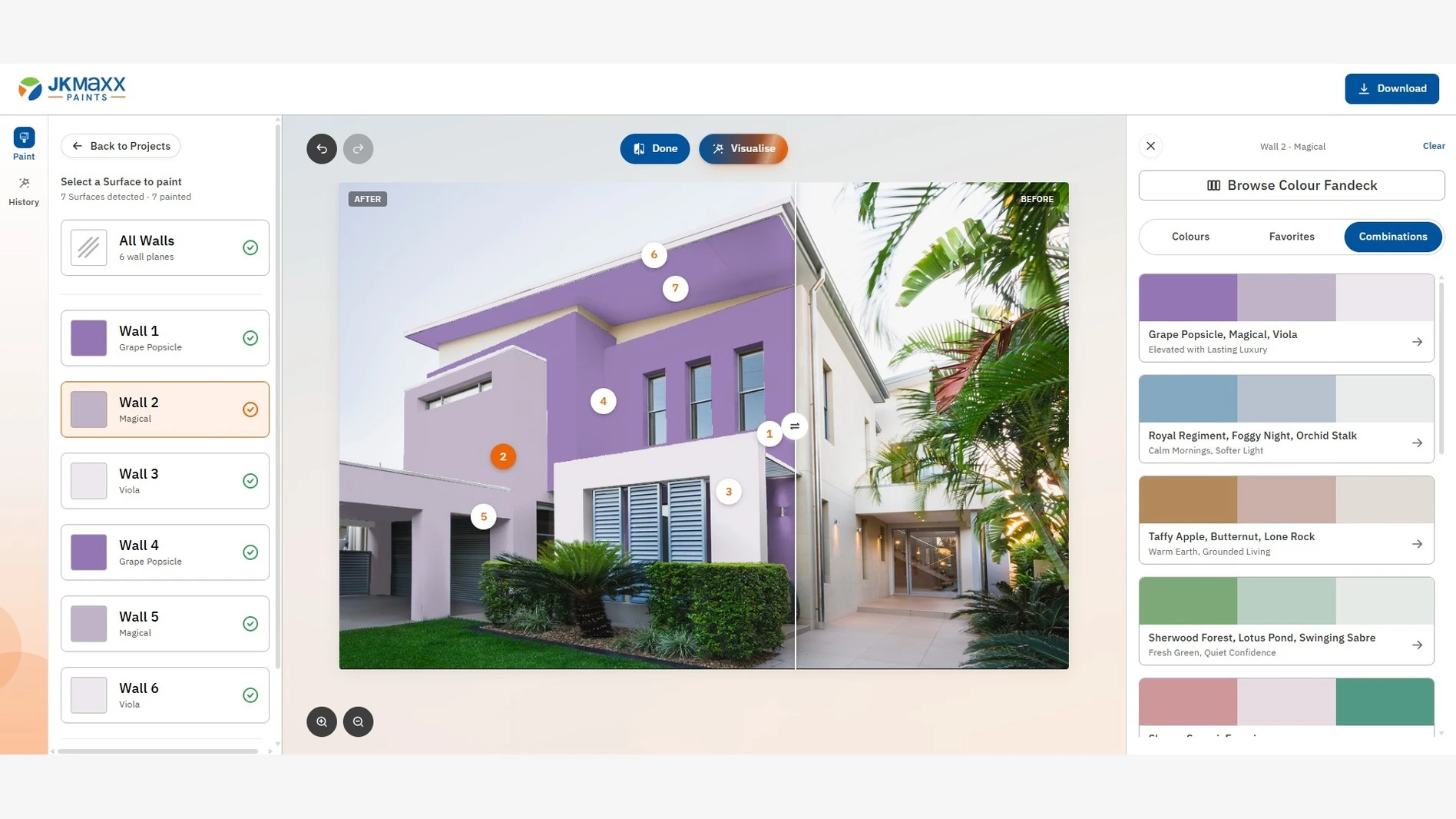
- Surface-First Approach: The editor treats each surface as its own object. Detected walls are listed individually alongside an "All Walls" control, numbered on the image and linked to the colour panel, so a user always knows which wall they are painting.
Key Features Delivered
- Paint Your Own Room - upload a room photo and start painting detected surfaces
- Paint a Sample Room - ready templates by room type, including seven exterior house templates
- Project naming and saved projects with history, so users can return to earlier work
- Per-wall and all-walls painting with a live surface list
- Colour fandeck browser with Colours, Favorites and Combinations tabs
- Ready-made three-shade combinations with mood labels, applied in one tap
- Before/after view, undo and redo, and zoom controls
- Download of the finished visual to share with family, painters or dealers
Design Highlights
- Decision-first, not decoration - the interface keeps the room image central, with surfaces on the left and colours on the right, so nothing competes with the result
- Wall-level control - numbered surface markers on the image tie each wall to its colour card, which avoids guessing what a click will change
- Fandeck-native - shade names, combinations and mood labels come from JKMaxx's own colour system, not a generic palette picker
- Two ways in - a photo upload for users who are ready, and sample rooms for users who are browsing
Building a visualizer that shows customers the finished result before they buy? Techtonic develops fast, easy-to-use web tools with Next.js and Node.js for paint, tile, laminate and surface brands that need their own catalogue and colour system built in. Start Your Project →