
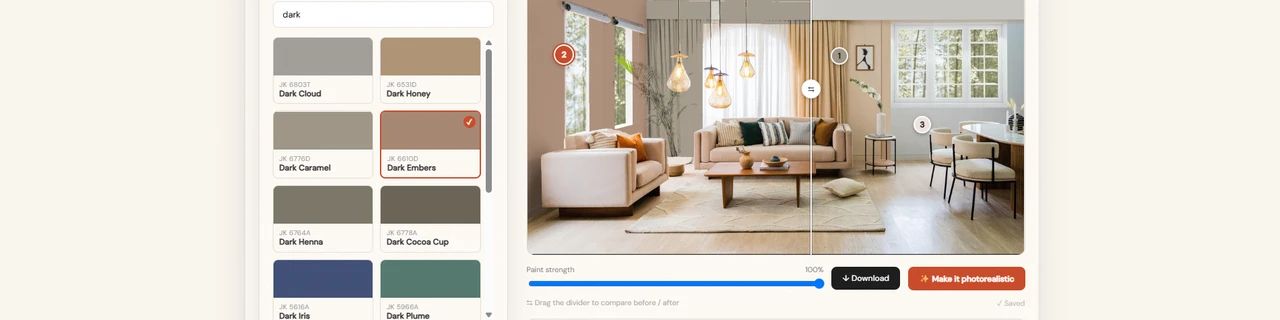
Our wall paint visualizer lets customers upload a photo of their own room, apply any shade from your colour range, and see the painted result in seconds - turning colour hesitation into a confident purchase.
Automatic Wall Detection
Your Shade Card Online
True-to-Wall Colour
Photorealistic Preview
Saved Rooms
Enquiry Capture
Choosing a wall colour is the slowest step in any painting decision. Printed shade cards are small, screens exaggerate colour, and a sample patch takes days to dry. A wall paint visualizer removes that delay by showing the customer their own room, in their own light, in the shade they are considering.
Each wall is detected from the uploaded photograph, so the room's existing shadows, texture and daylight are preserved rather than replaced. Shades are drawn directly from your product catalogue with their correct names and codes, and rendered using the physical behaviour of applied paint - so the preview reflects how the colour will settle on a real wall rather than how it glows on a display. Every room is saved to the customer's account, ready to revisit, recolour and share with family or a contractor.
For paint manufacturers, retail chains and dealer networks, the commercial effect is direct: longer time on site, fewer abandoned decisions, less colour-related return traffic, and a qualified enquiry captured at the moment the customer has settled on a shade.
What is a wall paint visualizer?
A wall paint visualizer lets customers upload a photo of their own room and preview any shade from a paint brand's actual colour range applied to their walls, replacing printed shade cards and guesswork with a realistic, personalised preview.
How does a wall paint visualizer work?
The tool detects every wall in the uploaded photo, applies the selected shade using the physical behaviour of real paint rather than a flat colour overlay, and renders a photorealistic preview that preserves the room's existing shadows, texture, and lighting.
Who should use a wall paint visualizer?
Paint manufacturers, retail chains, and dealer networks selling through showrooms or online catalogues benefit most — anywhere a customer currently relies on a small printed shade card or a slow-drying sample patch to make a colour decision.
Does it use our own paint colour range?
Yes - shades are pulled directly from the paint brand's own colour catalogue with correct names and product codes, so the preview matches what's actually available to purchase, not a generic colour approximation.
Can customers save and revisit their rooms?
Yes - every room is saved to the customer's account, so they can return later to compare shades, revisit a previous preview, or share it with family or a contractor before deciding.
Does the wall paint visualizer work on mobile?
Yes - the visualizer is built to work across devices, so customers can photograph a room and preview shades directly from a phone or tablet in-store or at home.
Can it connect to our CRM or dealer network?
Yes - enquiry data captured through the visualizer can be routed directly into a CRM or dealer network, turning each completed preview into a qualified, trackable lead rather than an anonymous site visit.
AAC-06, Shipra Krishna Azure, Kaushambi, Ghaziabad,Uttar Pradesh, India
ankur@wearetechtonic.com
+919910895680
AAC-06, 2nd Floor, Shipra Krishna Azure, Kaushambi, Ghaziabad,Uttar Pradesh, India
ankur@wearetechtonic.com
+919910895680